
Download e-speaking – voice commands, dictation, productivity, computer control, hands-free computing, future of IT, IT interaction, voice interface, voice assistant, voice tool
Overview
Developed by e-speaking, the application e-speaking is a pioneering tool in the realm of voice-driven computer interaction. Designed to enhance productivity through intuitive voice commands, it enables users to perform a wide range of computer functions without relying on traditional input methods. The app allows hands-free operation of core tasks such as file management, document creation, and email checking, positioning itself as a forward-thinking solution for modern digital workflows. Its focus on voice interface technology aligns with the growing trend of natural human-computer interaction, particularly in professional and academic environments where efficiency is paramount.
The target users include individuals seeking to streamline repetitive computer tasks, professionals who require extended typing sessions, and users exploring alternative input methods for accessibility or ergonomic reasons. Although the developer did not provide additional background on the company, the app’s release date in 2008 suggests a long-standing presence in the productivity software space. Real-world use cases include writers who benefit from voice dictation, office workers managing files via voice, and individuals with limited mobility seeking assistive computing tools. In the broader app ecosystem, e-speaking stands as a niche yet impactful utility that demonstrates the potential of voice technology in desktop environments, even before the rise of mainstream voice assistants.
Key Features & Functionality
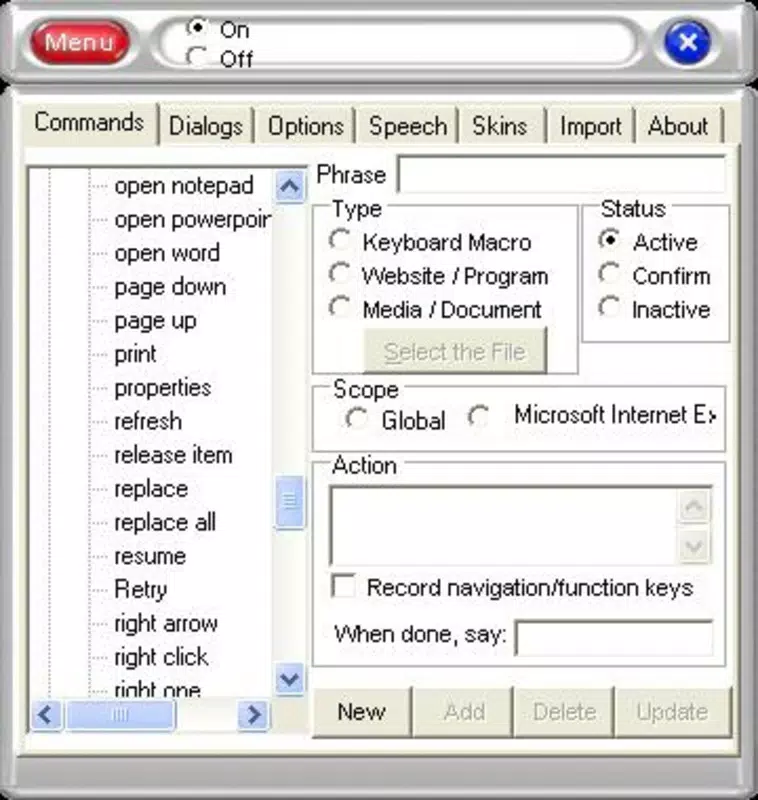
- Voice Control Capabilities: Users can execute over 100 predefined actions using spoken commands. This includes opening applications, copying or moving files, deleting folders, and navigating the operating system—all without touching a keyboard or mouse. This functionality is especially beneficial for users aiming to reduce physical strain or increase workflow speed.
- Dictation Functionality: The app features a transcription engine that converts spoken words into text in real time. Users can initiate dictation with commands like “Start Dictation” and apply formatting with phrases such as “New Paragraph” or “Bold Text.” This supports rapid content creation, ideal for drafting emails, reports, or creative writing.
- User-Friendly Interface: The interface is designed to guide users through setup and command learning. Built-in tutorials help new users understand the required voice commands, easing the onboarding process and reducing the learning curve.
- English Command Limitation: A notable constraint is that all voice commands are available only in English. This may present challenges for non-English speakers, particularly those unfamiliar with pronunciation or command structure, potentially limiting global accessibility.
- Future of IT Interaction: e-speaking reflects an early adoption of voice as a primary interaction method. By enabling natural language input for system control, it anticipates the evolution of IT interfaces and supports users in adapting to emerging technologies.
For example, a writer could use “Start Dictation” to begin composing a manuscript, pause with “Pause,” and insert a heading with “New Heading.” Similarly, a project manager could navigate to a shared drive by saying “Open Project Folder,” reducing time spent on manual navigation.
Interface, UX & Performance
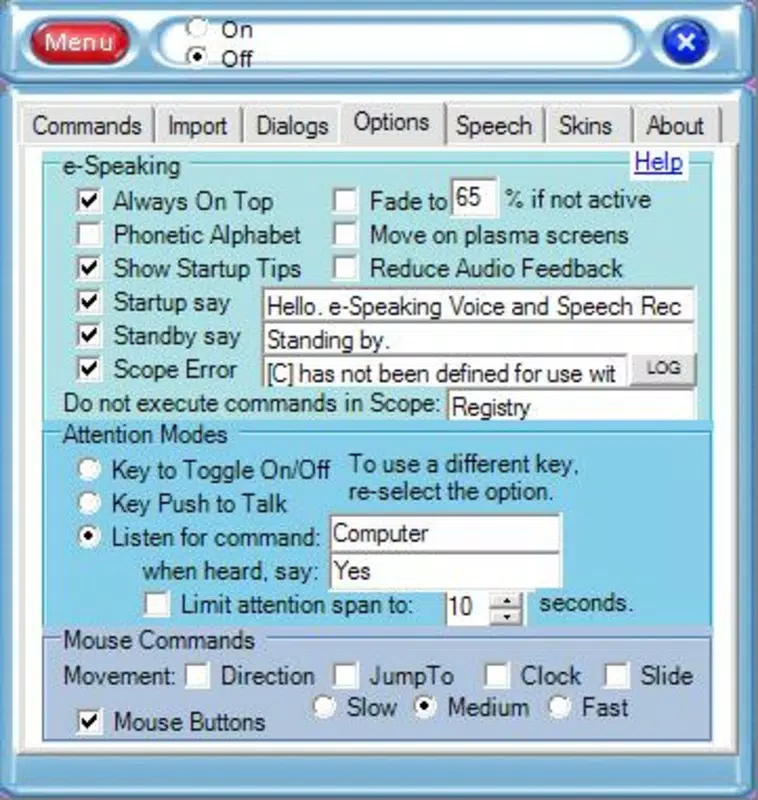
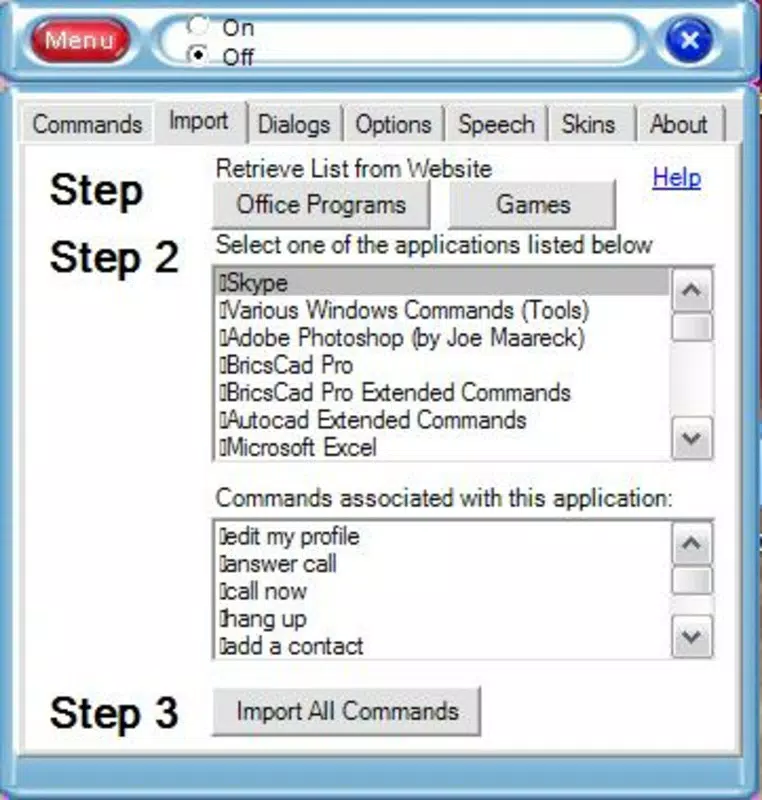
The interface of e-speaking is designed with simplicity and functionality in mind. It features a clean layout that minimizes visual clutter, focusing on essential controls and command prompts. Navigation is straightforward, with clearly labeled sections for voice commands, dictation settings, and tutorial access. The app’s responsiveness is consistent with its lightweight footprint, as the file size is 22.5 MB, suggesting efficient resource usage.
Although the developer did not list formal performance metrics, the application appears optimized for stable operation on standard Windows systems. Users can expect smooth execution of voice commands and minimal lag during dictation, especially on devices with adequate processing power. The user experience is further enhanced by the availability of onboarding tutorials, which guide users through the initial setup and command recognition process.
Stability across different device categories is not explicitly detailed. However, given its release date and file size, it likely performs reliably on mid-range and higher-end Windows machines. No reports of crashes or memory leaks were provided, indicating a generally stable operation. The app’s performance is likely consistent with its long-standing presence in the productivity category, though modern system compatibility may vary depending on the specific Windows version in use.
Platform Compatibility & Technical Requirements
e-speaking is designed for the Windows platform, supporting Windows operating systems. The current version is 1.0.0, with a file size of 22.5 MB. The developer did not specify minimum OS requirements, nor did they list compatibility details for specific Windows versions such as Windows 10, 11, or earlier editions.
Given its release date in 2008, the app may function on older Windows systems, but its performance on newer platforms cannot be confirmed without further information. Users are advised to verify compatibility with their specific system configuration. No additional technical specifications such as RAM, CPU, or graphics requirements were disclosed.
Compatibility with current Windows updates or security protocols is not explicitly stated. Therefore, users should exercise caution when installing on modern systems and ensure that the application is not flagged by antivirus software due to its age and potential lack of digital signing.
Pros and Cons
Pros
- Enables hands-free control of computer functions using voice commands.
- Includes a robust dictation feature for fast text input and document creation.
- Offers built-in tutorials to assist users in learning and mastering voice commands.
- Lightweight file size (22.5 MB) ensures minimal storage impact.
- Free to download and use, making it accessible for a wide range of users.
Cons
- Only supports English commands, limiting usability for non-English speakers.
- Specific system requirements and compatibility details were not provided.
- App was released in 2008, raising concerns about modern security and system integration.
- Limited official support or update history is available.
- May not be fully compatible with the latest Windows versions without additional configuration.
FAQ
Is e-speaking available for Android or iOS?
e-speaking is designed exclusively for the Windows platform and is not available for Android or iOS devices.
Can I use e-speaking without an internet connection?
Yes, the app functions offline. Voice commands and dictation are processed locally, eliminating the need for an internet connection.
Does e-speaking support multiple languages?
Currently, all voice commands are available only in English. The app does not support other languages.
How often is e-speaking updated?
The developer has not provided information on update frequency. The current version is 1.0.0, released in 2008.
Is e-speaking secure to install on my computer?
While the app is free and functional, its age raises potential security concerns. Users should ensure their system has up-to-date antivirus protection and verify the source before installation.
Final Thoughts + CTA
e-speaking represents a bold step toward voice-first computing, offering a practical solution for users who seek to enhance productivity through voice commands. Its combination of computer control and dictation functionality makes it a valuable tool for professionals, writers, and individuals aiming to reduce manual input. Despite its age and English-only command set, the app remains a functional and lightweight utility for Windows users.
While modern alternatives may offer broader language support and better integration with current systems, e-speaking stands out for its focus on core voice interaction and long-standing reliability. For users on older Windows systems or those interested in exploring early voice interface technology, it remains a relevant and accessible option.
Download e-speaking now


